First of all, it is important to mention that TuxGuitar is written in the Java programming language. Therefore, the audio output methods are heavily depending on Java. There is a dedicated API in Java for MIDI sound, which uses "soundbanks", also called soundfonts. A soundbank is a file that contains sound samples for all the required instruments.
In TuxGuitar prior to version 1.0, using the soundbanks was the only way to play the sound, and it was totally independent of your system MIDI settings.
Since version 1.0, TuxGuitar includes several operating system dependent plugins that allow audio output over the system's MIDI devices. The appropriate plugins are included in the distribution packages for the various operating systems, so you don't need to install them manually. By default, the plugin best suited for your operating system is activated, but you can switch to another one in the plugin dialog, if you want to use some special output functions.
Sound settings
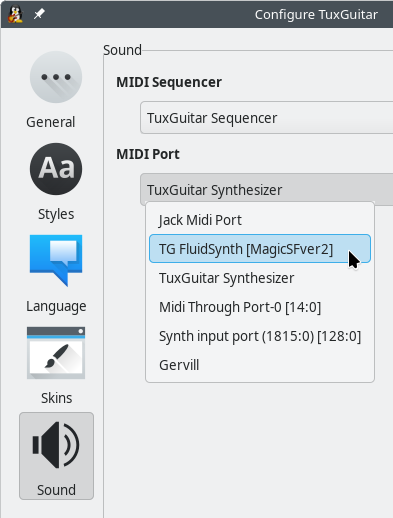
In the Tools → Settings → Sound dialog, you can select the MIDI Sequencer, i.e. the pice of software that extracts the MIDI events from all tracks stored in TuxGuitar and combines them into the currently played MIDI sequence, a list of time-stamped MIDI data. This sequence is then sent to the MIDI Port, where it is converted into the actual audio stream by combining the MIDI events with the sound samples extracted from the soundbank file or from other sources. The audio stream can also be further processed, mixed, etc., and is finally output to the loudspeakers.
Audio Output Plugins
The MIDI sequencers and MIDI ports are provided by Audio Output Plugins. To find all output plugins supported on your operating system, type "output" in the search field on top of the Tools → Plugins dialog:
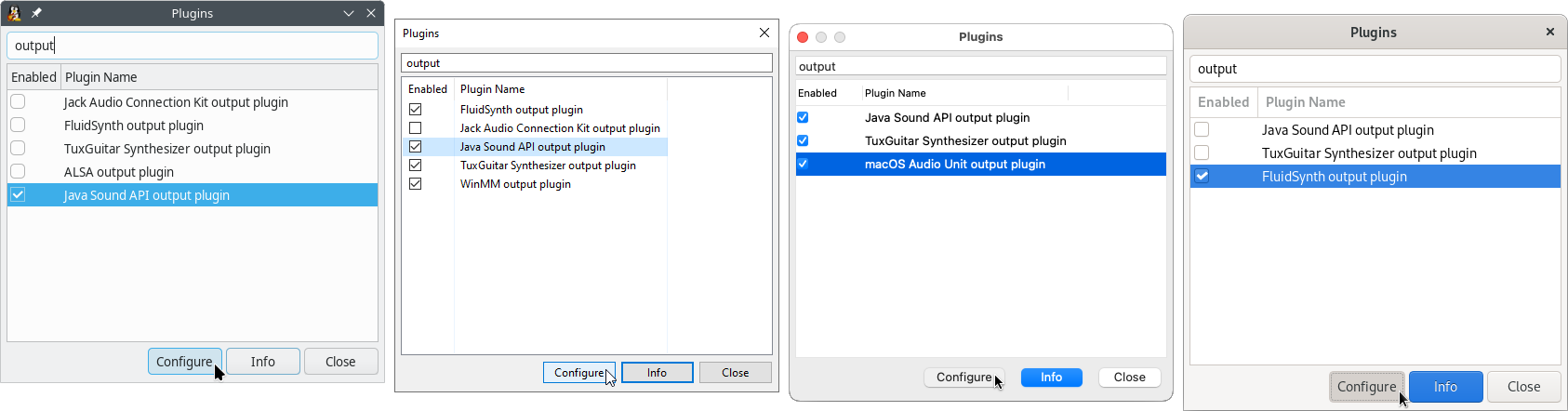
The images above show all available audio output plugins on Linux, Windows, macOS and FreeBSD.
In the the tables below you can see the MIDI sequencers and ports provided by the plugins and the default output settings for each OS.
Bold Plugin name: Plugin is activated by default
Bold MIDI Sequencer/Port: Default sound output
| Output Plugins on Linux | ||
| Plugin name | MIDI Sequencer | MIDI Port |
| TuxGuitar Synthesizer | TuxGuitar Sequencer* | TuxGuitar Synthesizer |
| Java Sound API | Real Time Sequencer | Gervill |
| FluidSynth | - | TG FluidSynth [SF-file] |
| Jack Audio Connection Kit | Jack Sequencer | Jack Midi Port |
| ALSA | - | Midi Through Port-0 [14:0] Synth input port (1610:0) [128:0] |
| Output Plugins on Windows | ||
| Plugin name | MIDI Sequencer | MIDI Port |
| TuxGuitar Synthesizer | TuxGuitar Sequencer* | TuxGuitar Synthesizer |
| Java Sound API | Real Time Sequencer | Gervill Microsoft MIDI Mapper Microsoft GS Wavetable Synth |
| FluidSynth | - | TG FluidSynth [SF-file] |
| Jack Audio Connection Kit | Jack Sequencer | Jack Midi Port |
| WinMM | - | Microsoft GS Wavetable Synth |
| Output Plugins on macOS | ||
| Plugin name | MIDI Sequencer | MIDI Port |
| TuxGuitar Synthesizer | TuxGuitar Sequencer* | TuxGuitar Synthesizer |
| Java Sound API | Real Time Sequencer | Gervill |
| macOS Audio Unit | - | AudioUnit graph midi playback |
| Output Plugins on FreeBSD | ||
| Plugin name | MIDI Sequencer | MIDI Port |
| TuxGuitar Synthesizer | TuxGuitar Sequencer* | TuxGuitar Synthesizer |
| Java Sound API | Real Time Sequencer | Gervill |
| FluidSynth | - | TG FluidSynth [SF-file] |
Some MIDI ports are automatically detected by the OS and may differ on your system.
* The TuxGuitar Sequencer is built-in and always available, even if no plugin is enabled. There is no built-in MIDI port, all MIDI ports are provided via plugins.
TuxGuitar Synthesizer
The TuxGuitar Synthesizer consists of four plugins that depend on each other.
TuxGuitar Synthesizer output plugin
The TuxGuitar Synthesizer output plugin adds the TuxGuitar Synthesizer MIDI Port, but cannot produce any sound output on its own.
Gervill and LV2 extensions
The audio output is handled by the Gervill extension plugin. In the plugin settings, you can select an SF2 or a DLS soundfont for the sound generation. By default, the "Magic Sound Font 2.0" is used.

With the Gervill extension, you can also select an individual soundfont and choose different MIDI settings for each instrument, as you can see in the screenshot below.
The LV2 extension is optional. It allows you to activate LV2 effect plugins for your instruments. TuxGuitar itself does not include any LV2 plugins, but you can load all LV2 plugins provided by the Guitarix virtual amplifier, for example. On Linux, just install the package named "guitarix-lv2" or similar, and TuxGuitar will automatically find all LV2 plugins on startup.
Both the Gervill and the LV2 extension are set up in the instrument settings of the Instuments dialog box. Please note that all the settings you make here are not stored in your computer's local TuxGuitar settings, but directly in the TuxGuitar tablature file.

Audio file export
With the Audio file export extension, you can write your song to an audio file using the TuxGuitar Synthesizer with the Gervill and LV2 extension settings from above. Please note that this extension does not allow you to export the audio stream from other output plugins such as FluidSynth or ALSA.

Java Sound API
The Java Sound API output plugin, relying on an SF2 or a DLS soundbank file, is still available on all desktop operating systems. You can change the soundbank with the "Configure" button in the plugins dialog:
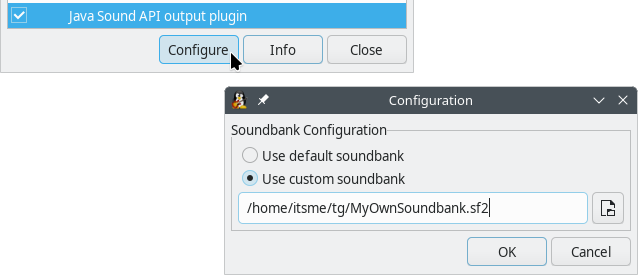
If the plugin is enabled, in the Sound tab of the Tools → Settings dialog you can choose the Real Time Sequencer as MIDI Sequencer and the MIDI Port called Gervill.
Platform-dependent Output Plugins
If you have enabled the ALSA output plugin on Linux or are using the WinMM output plugin on Windows, TuxGuitar will automatically detect your system MIDI ports (devices). These should show up in the MIDI Port list in the sound settings.
The FluidSynth output plugin allows you to load SF2, SF3 and DLS soundbanks on Linux, Windows and FreeBSD. You can load multiple soundbanks in the plugin settings and choose each individual one as a MIDI Port in the sound settings.
On macOS, you can load SF2 and DLS soundbanks with the Audio Unit output plugin.